Percentages come up in discounts at the store, tax calculations, exam scores, business margins, tip amounts, and investment returns. Yet most people only remember one of the three core percentage formulas, and the “reverse percentage” problem trips up nearly everyone.
If you are solving math homework, working out a sale price, calculating profit margins, or just need a quick answer, a reliable percentage calculator saves time and cuts down on errors. This guide covers how percentages work, walks through every type of percentage problem, and shows the fastest way to get a result with a free online percentage calculator.
What Is a Percentage Calculator?
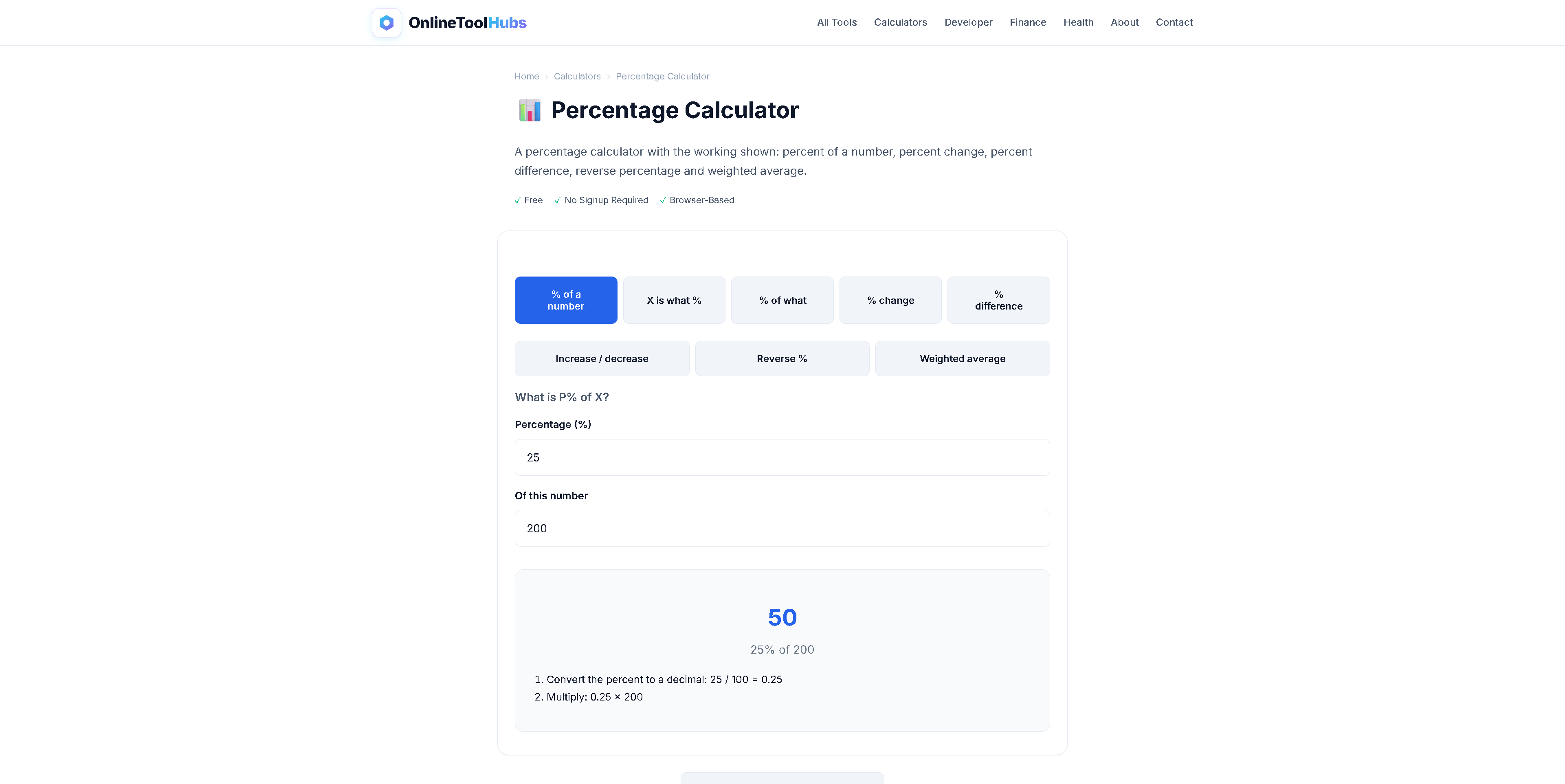
A percentage calculator is an online tool that solves percentage problems instantly. Instead of plugging numbers into a formula by hand and reaching for a traditional calculator, you type your values and get a verified result.
The Percentage Calculator on OnlineToolHubs covers all three fundamental percentage problem types:
- What is X% of Y? This is the most common type (e.g., “What is 15% of 240?”)
- X is what percent of Y? This finds the percentage ratio (e.g., “36 is what percent of 150?”)
- Reverse percentage. This finds the original number before a percentage was applied (e.g., “The sale price is $68 after a 15% discount. What was the original price?”)
Most online calculators only handle the first type. OnlineToolHubs covers all three, including the reverse calculation that most people get wrong.
Why Use an Online Percentage Calculator?
Speed and Accuracy
Manual percentage calculations involve multiplication, division, and sometimes algebra, and a single misplaced decimal point gives a completely wrong answer. The calculator does the work in milliseconds.
All Three Problem Types in One Place
Instead of searching for a different calculator for each percentage question, one tool handles:
- Percentage of a number
- What percent one number is of another
- Reverse (original value) percentage
No Signup, No Downloads
The tool runs directly in your browser. There is no app to install, no account to create, and no limit on how many times you can use it. Your numbers never leave your device.
Works on Any Device
On a desktop computer, a tablet, or your phone, the responsive interface adapts to your screen size.
How to Use the Percentage Calculator: Step-by-Step
Using the OnlineToolHubs Percentage Calculator takes three steps.
Step 1: Choose Your Calculation Type
Select which of the three percentage problems you want to solve:
- “What is X% of Y?”
- “X is what % of Y?”
- “What was the original value?”
Step 2: Enter Your Numbers
Type your values into the input fields. Each field is labeled, so you can see what goes where.
Step 3: Get Your Result
The answer appears instantly, with no “Calculate” button to press. The tool also shows the formula it used, so you can check the math or learn the method.
The Three Percentage Formulas Explained
Formula 1: What Is X% of Y?
Formula: Result = (Percentage ÷ 100) × Number
Example: What is 18% of 450?
Result = (18 ÷ 100) × 450 = 0.18 × 450 = 81
Use cases: tips, discounts, tax amounts, commissions, or any “portion of a whole” problem.
Formula 2: X Is What Percent of Y?
Formula: Percentage = (Part ÷ Whole) × 100
Example: 72 is what percent of 300?
Percentage = (72 ÷ 300) × 100 = 24%
Use cases: exam scores, batting averages, completion rates, conversion rates, and market share calculations.
Formula 3: Reverse Percentage (Finding the Original Number)
Formula: Original = Final Value ÷ (1 ± Percentage/100)
Example: A laptop costs $680 after a 15% discount. What was the original price?
Original = $680 ÷ (1 - 0.15) = $680 ÷ 0.85 = $800
Use cases: finding pre-discount prices, calculating pre-tax amounts, and working backwards from a restaurant bill that includes a tip.
Most people get this calculation wrong by adding 15% back to $680, which gives $782. That is incorrect, and the calculator prevents the mistake.
Real-World Use Cases for Percentage Calculations
| Scenario | Calculation Type | Example |
|---|---|---|
| Restaurant tip | X% of Y | 20% of $85 bill = $17 tip |
| Exam grade | X is what % of Y | 42 out of 50 = 84% |
| Sale discount | X% of Y | 30% off $120 jacket = $36 savings |
| Profit margin | X is what % of Y | $15 profit on $60 cost = 25% margin |
| Tax calculation | X% of Y | 8.5% sales tax on $249 = $21.17 |
| Pre-sale price | Reverse percentage | $170 after 15% off → original was $200 |
| Investment return | Percentage increase | Stock from $45 to $63 = 40% gain |
| Weight loss | Percentage decrease | 200 lbs to 180 lbs = 10% loss |
Percentage Calculator vs. Spreadsheets and Other Tools
| Feature | OnlineToolHubs Calculator | Google Sheets / Excel | Phone Calculator |
|---|---|---|---|
| Handles all 3 problem types | ✅ Yes | ⚠️ Manual formulas | ❌ No |
| Shows the formula used | ✅ Yes | ❌ Hidden in cells | ❌ No |
| Reverse percentage | ✅ Built-in | ⚠️ Must know formula | ❌ No |
| No account required | ✅ Yes | ❌ Google account | ✅ Yes |
| Works offline (after load) | ✅ Yes | ❌ Cloud-based | ✅ Yes |
| Mobile-friendly | ✅ Responsive | ⚠️ Clunky on mobile | ✅ Yes |
Tips for Working With Percentages
-
Remember the reverse formula. Adding a percentage back is not the same as reversing a percentage. If something dropped 20%, divide by 0.80 to find the original, because adding 20% back gives the wrong number.
-
Convert between fractions, decimals, and percentages. 25% = 0.25 = 1/4, and knowing these equivalents makes mental math faster.
-
Use percentage change for comparisons. When comparing two numbers over time, percentage change
((new - old) ÷ old × 100)tells you more than the raw difference. -
Bookmark the tool. If you use percentages regularly for business, school, or personal finance, save the calculator page for one-click access.
Try the Percentage Calculator Now: Free, No Signup Required
Stop second-guessing your math. For a tip, a discount, an exam score, or a reverse-engineered sale price, this tool gives you the answer in seconds.
Use the Free Percentage Calculator on OnlineToolHubs. No account is needed, it runs entirely in your browser, and your data never leaves your device.
Frequently Asked Questions
How do I calculate a percentage of a number?
To calculate a percentage of a number, multiply the number by the percentage and divide by 100. For example, 25% of 200 = (200 × 25) ÷ 100 = 50. The free percentage calculator at OnlineToolHubs does this instantly.
What is the formula for percentage increase?
The percentage increase formula is: ((New Value - Old Value) ÷ Old Value) × 100. For instance, if a price goes from $80 to $100, the increase is ((100 - 80) ÷ 80) × 100 = 25%.
Can I calculate reverse percentages online?
Yes. A reverse percentage calculation finds the original number before a percentage was applied. For example, if a discounted price is $75 after a 25% discount, the original price was $75 ÷ (1 - 0.25) = $100.
Is this percentage calculator free to use?
Yes, the percentage calculator on OnlineToolHubs is 100% free with no signup, no account, and no usage limits. It runs entirely in your browser, so your data never leaves your device.