QR codes appear on restaurant menus, product packaging, business cards, event tickets, advertising materials, and even gravestones. They link the physical and digital worlds: anyone with a smartphone camera can open a URL, download contact info, connect to WiFi, or read a message.
Creating a QR code should be simple, free, and fast. Yet many “free” generators add watermarks, require account creation, or limit downloads. The QR Code Generator on OnlineToolHubs generates real, scannable QR codes with adjustable error correction. It is completely free, with no watermarks, no account, and no limits.
What Is a QR Code?
A QR code (Quick Response code) is a two-dimensional barcode that stores data in a grid of black and white squares. Traditional barcodes store data in one dimension (horizontal lines). QR codes encode data both horizontally and vertically, so they can hold much more information, up to 4,296 alphanumeric characters.
Denso Wave (a Toyota subsidiary) invented QR codes in 1994 to track automotive parts. Today they are used around the world for:
- Marketing: linking to websites, landing pages, and promotions
- Payments: mobile payment systems (WeChat Pay, UPI, PayPal)
- Authentication: two-factor authentication apps (Google Authenticator)
- Events: digital tickets and boarding passes
- WiFi sharing: instant network connection without typing passwords
- Contact sharing: vCard-encoded business card information
How to Generate a QR Code: Step-by-Step
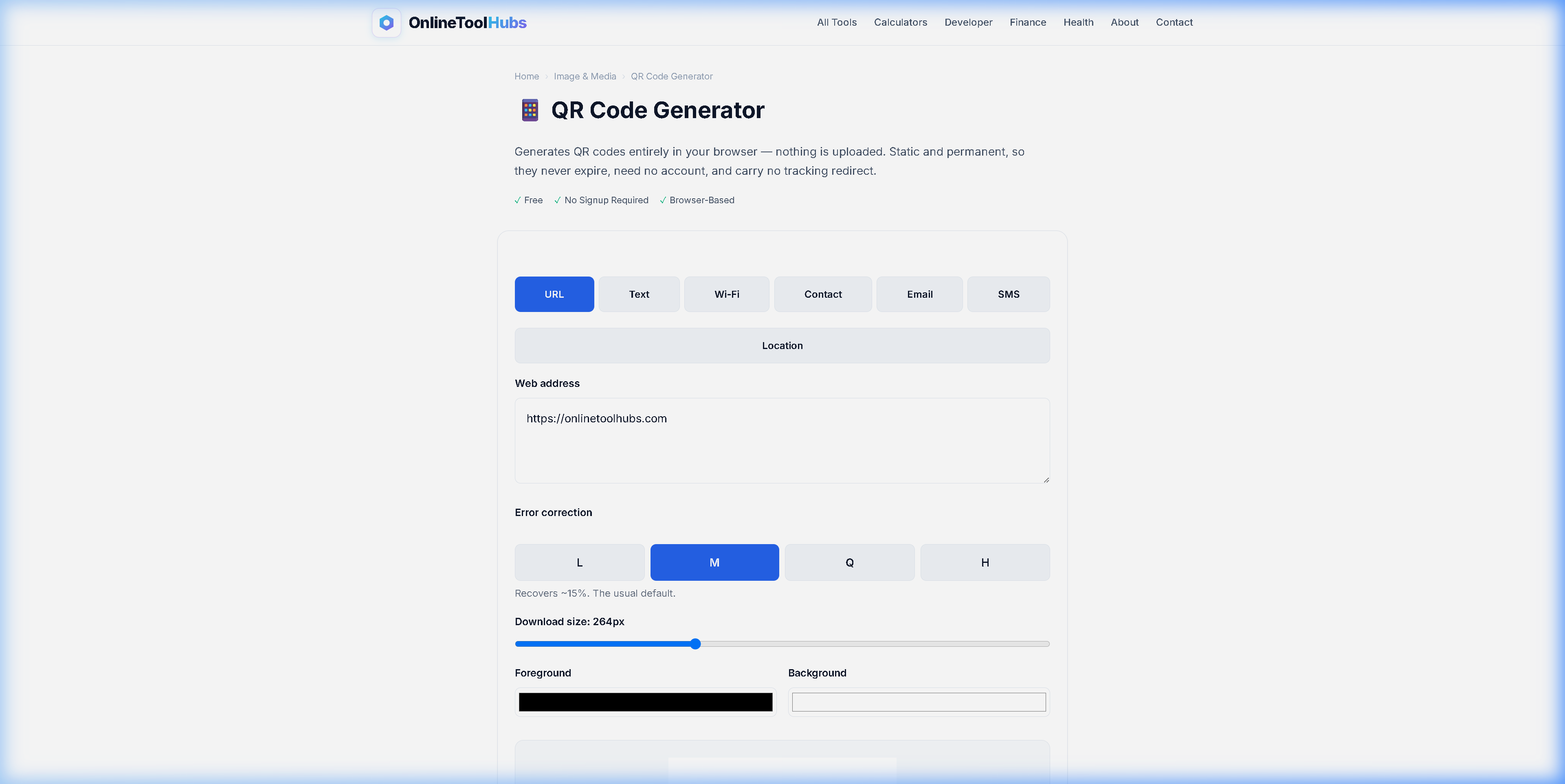
Step 1: Enter Your Data
Open the QR Code Generator and type or paste the data you want to encode. This can be:
- A URL (e.g.,
https://yourwebsite.com) - Plain text
- WiFi credentials
- An email address
- A phone number
Step 2: Adjust Error Correction (Optional)
Choose your error correction level:
| Level | Recovery Capacity | Best For |
|---|---|---|
| L (Low) | 7% of data | Clean digital displays |
| M (Medium) | 15% of data | General-purpose (default) |
| Q (Quartile) | 25% of data | Printed materials |
| H (High) | 30% of data | QR codes with logos overlaid |
With higher error correction, the code still scans even if part of it is damaged or obscured.
Step 3: Download Your QR Code
Click the download button to save your QR code as an image file. You can use it in print materials, websites, presentations, emails, or anywhere else.
Common QR Code Use Cases
Small Business & Retail
- Print QR codes on receipts linking to a review page
- Place them on product labels linking to instruction manuals
- Add them to storefront windows linking to your website or menu
Networking & Business Cards
- Encode your vCard contact information so people can save your details with a single scan instead of typing your name, email, and phone number by hand
Events & Conferences
- Generate unique QR codes for event tickets
- Link to schedules, maps, or speaker bios
- Create WiFi QR codes so attendees can connect without asking for the password
Product Packaging
- Link to product registration pages
- Provide setup instructions or video tutorials
- Enable warranty activation
Real Estate
- Place QR codes on “For Sale” signs linking to the full listing
- Include them in brochures linking to virtual tours
QR Code Generator: Free vs. Paid Services
| Feature | OnlineToolHubs (Free) | QR Code Monkey (Free) | Beaconstac (Paid) |
|---|---|---|---|
| Price | Free forever | Free (basic) | $5-49/month |
| Watermark | ❌ None | ❌ None | ❌ None |
| Account required | ❌ No | ❌ No | ✅ Yes |
| Dynamic QR codes | ❌ Static only | ❌ Static only | ✅ Dynamic |
| Error correction levels | ✅ All 4 levels | ✅ All 4 levels | ✅ All 4 levels |
| Scan tracking/analytics | ❌ No tracking | ❌ No tracking | ✅ Built-in |
| Data stays local | ✅ Browser-based | ❌ Server-processed | ❌ Server-processed |
| Bulk generation | ❌ One at a time | ❌ One at a time | ✅ Bulk API |
When free is enough: if you need a static QR code that links to a URL, displays text, or shares WiFi credentials, and you don’t need scan analytics, a free generator covers it.
When paid makes sense: if you need dynamic QR codes (where the destination URL can be changed after printing), scan analytics, or bulk generation via API, a paid service adds value.
Tips for Creating Effective QR Codes
-
Test before printing. Scan your QR code with multiple devices before committing it to print materials.
-
Use error correction level Q or H for printed materials. Print quality, folding, and wear can damage parts of the code, and higher error correction keeps it scannable.
-
Make sure the contrast is strong. QR codes need strong contrast between the dark modules and the light background. Black on white works best, and light colors on light backgrounds should be avoided.
-
Include a call-to-action. A QR code by itself means nothing to most people. Add text like “Scan for menu,” “Scan to connect to WiFi,” or “Scan for 20% off.”
-
Don’t make them too small. The minimum recommended size is 2 × 2 cm (about 0.8 × 0.8 inches) for close-range scanning. For posters or billboards, scale up in proportion to the scanning distance.
-
Use a URL shortener for long URLs. Shorter data creates simpler, less dense QR codes, which are easier to scan from a distance.
Try the QR Code Generator Now: Free, No Signup Required
Create QR codes for your business cards, marketing materials, event tickets, WiFi sharing, and more, completely free.
Generate Free QR Codes on OnlineToolHubs. It needs no account, adds no watermarks, has no limits, and runs in your browser.
Frequently Asked Questions
How do I create a QR code for free?
Go to the QR Code Generator on OnlineToolHubs, enter your data (URL, text, WiFi, etc.), adjust error correction if desired, and download the QR code image. It is completely free with no watermark.
What can I encode in a QR code?
QR codes can encode URLs, plain text, WiFi credentials, email addresses, phone numbers, SMS messages, vCard contact information, and more.
What is QR code error correction?
Error correction allows a QR code to remain scannable even if part of it is damaged or obscured. Four levels exist: L (7%), M (15%), Q (25%), and H (30%).
Do QR codes expire?
No. QR codes are simply encoded data and do not expire. As long as the destination URL remains active, the QR code works forever.